Contact Us (02) 9388 1741

    Powertech Password Self Help for IBM i

    Password Self-Service Tool for IBM i

    Fortra Products
    Powertech Password Self Help for IBM i
    Powertech Password Self Help for IBM i
    Password Self-Service Tool for IBM i
    Powertech-Password-Self-Help-for-IBM-i
    Our Price: Request a Quote

    Improve productivity and enhance security

    Password resets account for up to 50% of help desk calls. Powertech Password Self Help for IBM i lets users reset their own passwords securely, in seconds, so your IT team can focus on higher-value work.

    Increase Productivity for IT and Users

    Enabling users to reset their own IBM i passwords immediately removes productivity bottlenecks for both users and the IT support technicians who would typically have to process the request. When users don't have to file a help desk ticket for password resets, IT can spend their time addressing more critical issues.

    Enhance Security

    Guarantee authenticity of users and prevent fraudulent reset requests by asking a series of challenge questions that must be answered correctly before a reset will be approved.

    Set a Strong Password Policy

    Configure settings to meet security policy requirements. Set rules for the minimum number of password characters, whether repetition of characters is allowed, and whether answers must be case sensitive.

    Maintain an Audit Trail

    A password self-service tool can help fulfill auditor requirements by maintaining a full record of both successful and unsuccessful password reset attempts.

    Key Features

    Secure password reset

    Secure Self-Service Password Reset

    With Powertech Password Self Help for IBM i, users can reset their own IBM i passwords by answering a series of validation questions. Once questions are answered correctly, the password resets immediately. For an additional layer of security users can set their own default reset password known only to themselves.

    Instant alerts

    Instant Alerts

    Respond quickly and take action when user profiles are at risk. Powertech Password Self Help for IBM i sends instant alerts to administrators or other designated security personnel when unsuccessful password resets occur, allowing administrators to take corrective action and ensure user profiles are secure.

    User options

    User Registration Options

    Administrators can manage user profile registration in less time, ensuring key profiles are protected. Powertech Password Self Help for IBM i provides a menu where administrators can automate user registration with a command line program, register individual users, and protect powerful profiles like QSECOFR.

    Custom settings

    Customizable Security Settings

    Match the software settings with your organization’s security policy, including the number and type of challenge questions and number of self-service password attempts allowed.

    Password reset dashboard

    Customizable Dashboards

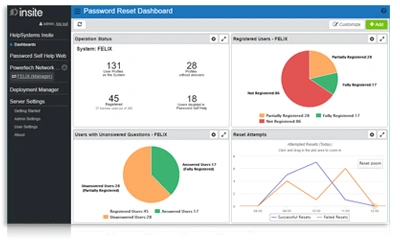
    Dashboards in Fortra Insite display Powertech Password Self Help for IBM i data at a glance. Keep an eye on registered users, reset attempts, and other key metrics.

    Password reset dashboard

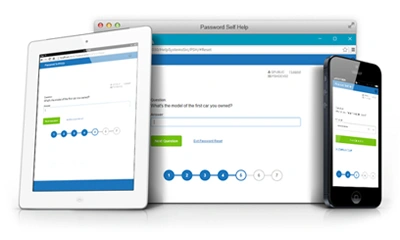
    Modern Web User Interface

    Powertech Password Self Help for IBM i integrates with Fortra Insite web user interface for user setup and password reset functions—empowering your users to reset passwords from anywhere. Whether they’re at their desktops or using smartphones, your users can manage their IBM i passwords from a modern, mobile web user interface, without involving your IT staff.

    Documentation

    Download product documentation and resources.

    Discover More

    Similar Products

    Explore other configurations and models that might suit your needs.

    Identity & Access Management Recommended

    Identity & Access Management

    #Identity-Access-Management

    Access Assurance Suite Recommended

    Access Assurance Suite

    #Access-Assurance-Suite

    Core Privileged Access Manager (BoKS) Recommended

    Core Privileged Access Manager (BoKS)

    #Core-Privileged-Access-Manager-BoKs

    Call a Specialist
    Today!

    Our team of experts is ready to help you find the perfect solution for your business needs. Get personalized advice and competitive quotes.

    Monday - Friday: 9:00 AM - 6:00 PM AEST
    Sydney, Australia

    Speak to an Expert

    We're here to help with any questions

    Call us now
    (02) 9388 1741